What’s new in TeakReader
The biggest changes from recent updates, newest first. Update the app from the App Store or Google Play to get them.
October 2026
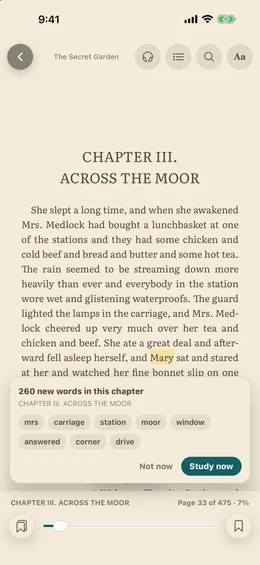
Learn the words before the chapter
New words at each chapter
When you move into a new chapter, a card shows how many new words it has and the most common ones. Study them in one tap, or keep reading.
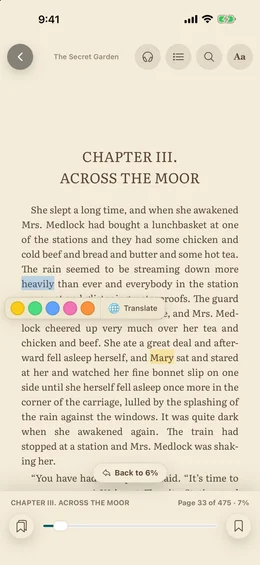
Words you are learning are marked in the text
Words you saved as Learning get a soft tint in every book, so you notice them when they come back. Turn it off under Learning in the Aa menu.
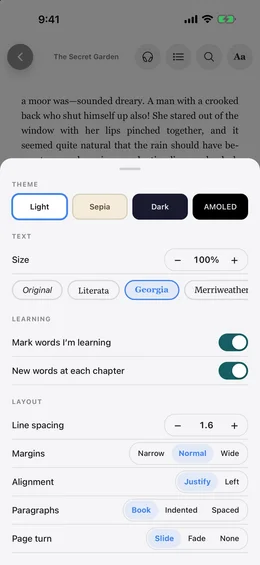
Page-turn animation
Choose Slide, Fade, or None for page turns.
October 2026
Listen while you read
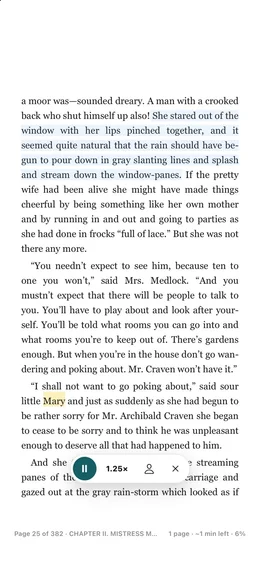
Read aloud with sentence highlighting
Tap the headphones button. The app reads the page, highlights each sentence, and turns pages for you. It keeps going with the screen locked.
How read aloud works →Speeds and voices
Pick 0.75× to 1.5× and choose an English voice and accent. The voice picker shows how to download free, natural-sounding voices on iPhone and Android.
October 2026
A much better reader
Cleaner pages
Books open with the controls hidden. Tap the middle of the page to show them, or tap the sides to turn pages.
New fonts and layout
Literata, Merriweather, Atkinson Hyperlegible, and OpenDyslexic join the font list. Set line spacing, margins, alignment, and paragraph style.
Dyslexia-friendly settings →Brightness, warm light, keep screen on
Dim the page or warm it up for night reading without changing your phone settings.
Time left in chapter
The bottom bar shows the chapter, pages left, and about how many minutes the chapter will take you.
October 2026
Find your way around a book
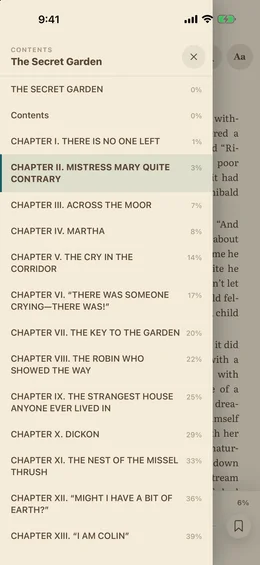
New contents
Chapters and parts, with the chapter you are in marked and where each chapter starts.
Search the whole book
Find every place a word or name appears and jump straight to it.
Progress slider and “Back to”
Drag to any point in the book. After a jump, one tap brings you back.
Footnotes in a popup
Notes open over the page instead of sending you to the end of the book.
October 2026
Highlights that follow you
Five highlight colours and notes
Select text and tap a colour. Add notes from the new Highlights tab.
Synced highlights and reading position
Highlights, bookmarks, and where you stopped are saved to your account. Open the book on another phone or tablet and continue from the same page.
Share your highlights
Send all highlights from a book, grouped by chapter, to Notes, email, or any app.
September 2026
Bookmarks, favourites, and smarter lookups
Bookmarks and favourites
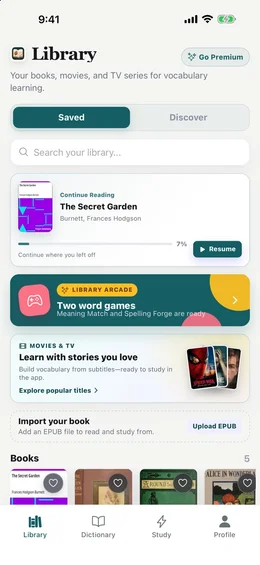
Save any page and jump back to it. Tap the heart on a book to keep it at the top of your Library.
Book links open in the app
Links like teakreader.com/read/1342 open that book straight in TeakReader.
Better word lookups
Hyphenated words like “to-day” and “disagreeable-looking” now show a definition.
Ready to read
Get the latest TeakReader.
Free to start on iPhone, iPad, and Android.