Generic eBook & EPUB readers
Good for simple reading, but vocabulary study requires switching between external dictionaries, translators, and separate note apps.
EPUB reading with vocabulary built in
TeakReader turns your EPUB books into a complete English reading and vocabulary system. Import any eBook, tap unfamiliar words for instant definitions, preview chapter difficulty with smart meaning indicators, translate tricky sentences, and master vocabulary with spaced-repetition flashcards.


Updated
Short answer
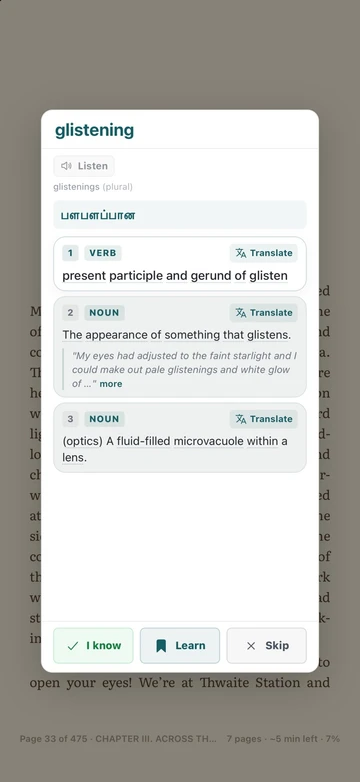
TeakReader is a free EPUB reader for iPhone, iPad, and Android with an English dictionary built in. Tap any word once to see its meaning, pronunciation, and a translation in your language. It also reads books aloud, shows each chapter’s new words, and turns the words you save into flashcards.
English reading and vocabulary in EPUB
A generic EPUB or eBook reader may let you highlight text or trigger a basic lookup. But for serious English learners, building reading fluency still means constantly jumping between an e-reader, a translation tool, a dictionary app, and a flashcard deck.
That fragmentation disrupts narrative immersion, and isolated word lists lose the vital sentence context that makes English vocabulary stick.


Tap-to-define & meaning indicator
TeakReader embeds a comprehensive English dictionary directly inside your eBook pages. Simply tap any word to view instant definitions, phonetic pronunciation, CEFR level indicators, and grammatical forms without losing your reading position.
Easily categorize words as Known, Learning, or Ignored. TeakReader remembers every term across all your EPUBs, reinforcing them in spaced-repetition flashcards and arcade games.
Sentence translation
When complex syntax or idioms obscure comprehension, TeakReader provides full-sentence translation directly in the reading stream. It serves as an instant bridge when text gets tough, keeping you immersed in the story rather than stuck on grammar.
Translation usage adapts to free and premium plans, giving active readers the right level of scaffolding for their learning journey.

The dictionary of unfamiliar words in EPUBs
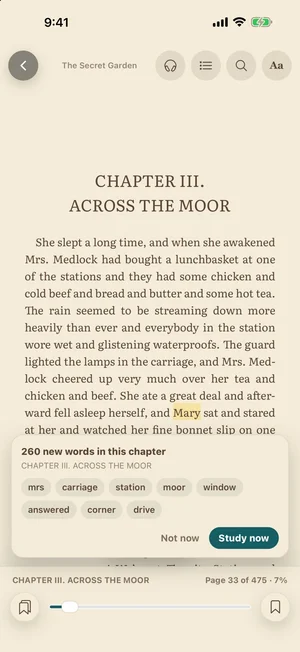
Before opening a chapter, TeakReader acts as your personal dictionary of unfamiliar words. It analyzes the entire book to reveal chapter-by-chapter comprehension percentages, CEFR vocabulary distribution (A1–C2), and top unknown words so you can pre-study key terms or dive in with confidence.


Book sources
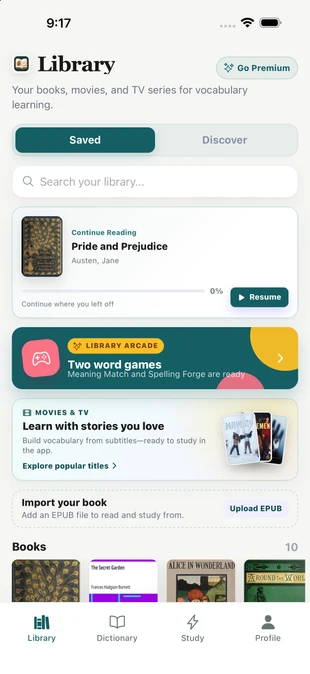
Easily import personal EPUB files, discover over 75,000 classics via integrated Project Gutenberg search, or read curated included titles. Every source feeds into the same built-in dictionary, CEFR analytics, and flashcard learning loop.
TeakReader is built strictly for open EPUB files. It is not an Amazon Kindle, DRM, PDF, MOBI, or AZW reader.


Cross-media memory
TeakReader keeps one unified vocabulary memory across personal EPUBs, Project Gutenberg classics, movies, and TV subtitles. Words acquired while reading novels effortlessly carry over when you watch popular film and television dialogue.
Explore how to learn English with movie subtitles to let your book reading and subtitle study reinforce each other automatically.
A complete e-reader
A dictionary is only useful if you enjoy reading in the app. TeakReader’s reader now has the comfort features of a dedicated ebook app, plus tools made for learners.
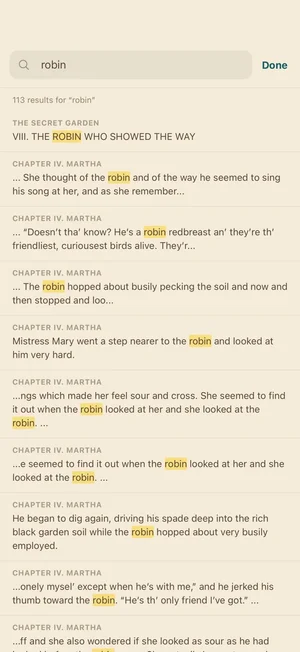
Find anything
Search finds every place a word or name appears, with the chapter for each result. Tap one to jump there.
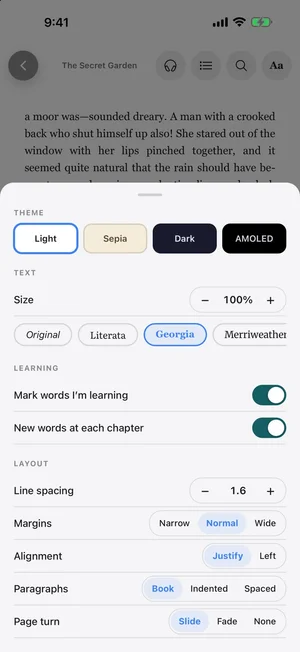
In the Aa menu you can change the theme, font, size, line spacing, margins, alignment, paragraph style, and page-turn animation, and switch the learning aids on or off.
The Best eBook Reader Comparison
TeakReader is built from the ground up for language acquisition: combining comfortable EPUB reading with instant tap-to-define lookup, CEFR difficulty indicators, sentence translation, and FSRS spaced repetition.
Good for simple reading, but vocabulary study requires switching between external dictionaries, translators, and separate note apps.
Useful for lookup definitions, but they have no connection to your books and cannot track reading comprehension.
Helpful for review, but pre-made decks lack the rich story context of the original sentence that made the word memorable.
The best eBook reader with a built-in dictionary: seamlessly combines EPUB reading, meaning indicators, sentence translation, CEFR stats, and FSRS flashcards in one app.
FAQ
By importing personal EPUBs or public-domain classics into TeakReader, you get an all-in-one English reading and vocabulary ecosystem: instant tap-to-define lookup, CEFR difficulty stats, unfamiliar word previews, sentence translation, and spaced-repetition flashcards generated straight from what you read.
Yes. TeakReader acts as a dynamic dictionary of unfamiliar words for your EPUBs. It scans each chapter to reveal top unknown words, displays CEFR meaning indicators, and provides one-tap definitions and phonetics directly on the reading page.
Unlike generic eBook readers that offer basic offline definitions with no retention system, TeakReader connects every tapped word in your EPUBs to a unified vocabulary memory with FSRS spaced-repetition flashcards, sentence translation, and Arcade mini-games.
Yes. TeakReader supports personal EPUB imports, then processes the book for reading, dictionary lookup, vocabulary tracking, comprehension analytics, and flashcard study.
Yes. You can tap words while reading to open dictionary information, examples, related forms, and vocabulary controls without leaving the reading flow.
Yes. Words you save from your EPUBs become levels in Meaning Match and Spelling Forge, the two word games in the Library Arcade.
Yes. TeakReader supports word and sentence translation, subject to the limits of your free or premium plan.
Yes. Words from EPUB reading can be marked for study and reviewed with TeakReader flashcards and spaced repetition.
Yes. For processed books, TeakReader can show chapter-level comprehension, unknown-word counts, and study options.
Yes. TeakReader includes Project Gutenberg search for public-domain classics that can feed the same dictionary, analytics, and flashcard workflow.
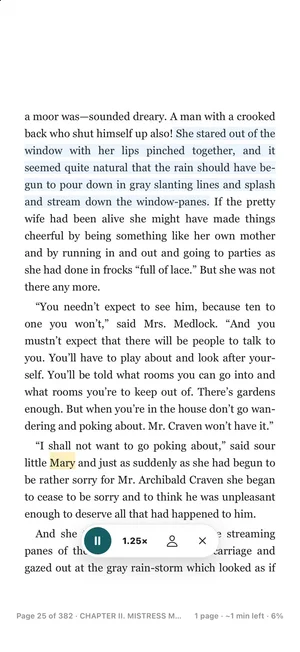
Yes. Tap the headphones button in the reader. It reads aloud sentence by sentence, highlights the sentence you hear, turns pages for you, and keeps playing with the screen locked. You can change the speed and voice.
Yes. The contents list shows every chapter with the current one marked, and search finds every place a word appears in the whole book. After a jump, a Back button returns you to where you were.
Yes. They are saved to your account, so you can continue on another phone or tablet from the same page. Highlights come in five colours, can have notes, and can be shared as a list.
Ten fonts, including Literata, Merriweather, Atkinson Hyperlegible, and OpenDyslexic, plus Light, Sepia, Dark, and AMOLED themes, line spacing, margins, alignment, brightness, and warm light.
TeakReader only supports EPUB files. It is not a Kindle, DRM, PDF, MOBI, or AZW reader.
Yes. TeakReader is available on iPhone, iPad, and supported M-series Macs through the App Store, and on Android through Google Play.
Ready to read
Download TeakReader on the App Store or Google Play for iPhone, iPad, supported M-series Macs, and Android.