Too easy
Known vocabulary dominates and the chapter may be better for relaxed reading than focused study.
Check before you read
Is this English book too hard for me? Add an EPUB or TXT file below to see its vocabulary level, CEFR word bands, and hardest words for free. Your file never leaves your device.

Free tool
Choose an EPUB or TXT file. You get the vocabulary level, word bands, and the hardest words in a few seconds.Your file stays on your device. It is read in your browser and never uploaded.
Estimated level
Share of all the words in the book, by how common each word is.
B2–C2 words that appear at least 3 times (names left out). Learn these first.
In the TeakReader app
Import the same EPUB in the app. It’s free.


How it works: each word is matched to a frequency list and grouped into CEFR-style bands (A1 = most common 5,000 words, up to C2). The level is an estimate based on vocabulary only, not an official CEFR test. Grammar, style, and topic can make a book feel harder.
Quick answer
Check how many of the book’s words you already know. If you know about 95–98% of the running words, you can usually read it comfortably.
See real examples: The Wizard of Oz (A2–B1), Dracula (B2), and Jane Eyre (B2–C1), or compare 24 classics by reading level.
The reading-level problem
Learners often choose books by title, reputation, or recommendations. That can work, but a famous classic can still be too difficult today, and a familiar story can hide dense vocabulary.
TeakReader makes the decision more concrete by connecting reading readiness to your known words, unknown words, CEFR vocabulary, and chapter-level stats.


Vocabulary shape
TeakReader can show A1-C2 vocabulary distribution, top unknown words, and Known, Learning, Ignored, and Unknown states for processed books and subtitle sets.
This is not an official CEFR test. It is a practical reading signal that helps you choose material and decide what to review next.
Chapter readiness
A whole book can feel intimidating, but chapter-level stats make the next step smaller. TeakReader can show comprehension, unknown counts, and Study buttons so you can choose an easy win or prepare for a harder section.

What the signal helps you decide
Reading level is not only a label like beginner, intermediate, or advanced. It depends on the words you already know and the words that appear often in the material you picked.
Known vocabulary dominates and the chapter may be better for relaxed reading than focused study.
Most words are familiar, with enough unknown vocabulary to make the chapter worth studying.
Unknown words appear often enough that a short study session first may make reading smoother.
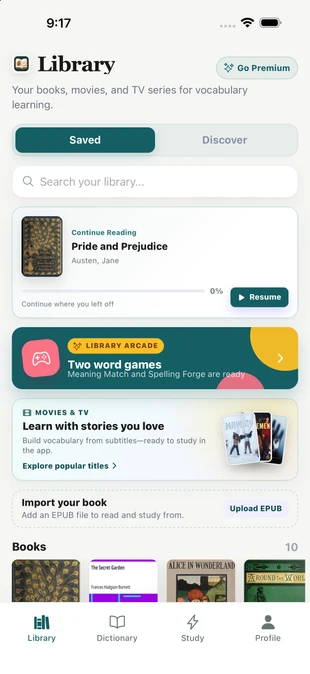

Books, movies, and TV
TeakReader tracks vocabulary across EPUB books, Project Gutenberg classics, movies, and TV subtitles. A word learned while reading can make subtitle vocabulary easier later, and subtitle study can help a future chapter feel more readable.
Personal vocabulary memory
Known, Learning, and Ignored decisions affect future stats. The more you read and review, the more useful TeakReader's unknown-word and comprehension signals can become.


Study what matters next
Once TeakReader surfaces top unknown words or a chapter Study button, you can review vocabulary from the material itself. That is more useful than starting with a blank deck or a generic list.
CEFR guardrail
TeakReader can classify and display vocabulary by CEFR levels, but it is not an official CEFR exam, placement test, or certificate. The point is practical: choose material, spot unknown words, and study before the book becomes frustrating.

FAQ
Yes. The checker on this page is free and needs no account. Your EPUB or TXT file is read in your browser and is never uploaded. The TeakReader app adds chapter difficulty, your personal level, and meanings for every word.
Books bought from Kindle, Apple Books, and most other stores are DRM-protected, so no outside tool can read their text. The checker works with DRM-free EPUB and TXT files, such as the free classics on Project Gutenberg.
Yes. For processed books, TeakReader can show chapter comprehension, unknown-word counts, CEFR vocabulary distribution, and top unknown words so you can decide what to read or study next.
Check what share of the book’s running words you already know. Around 95–98% usually means comfortable reading. TeakReader shows a book’s CEFR vocabulary distribution and your unknown words per chapter, so you can see this before you start.
No. TeakReader is not an official CEFR exam, certificate, or placement test. It uses CEFR vocabulary information as a practical reading and study signal.
Yes. For processed books, TeakReader can show chapter-level comprehension, unknown-word counts, and Study buttons.
Yes. Unknown words from any book can be reviewed via flashcards or practiced in Meaning Match and Spelling Forge word games in the Arcade.
Yes. TeakReader can surface frequency-ranked unknown words so you can study vocabulary that appears often in the material you chose.
Yes. TeakReader can process movie and TV subtitle vocabulary and connect it to the same vocabulary memory used for books.
TeakReader shows CEFR vocabulary stats and helps prioritize study. Use the app flow available for your processed book or subtitle set to review the words most worth learning next.
Yes. As you mark words Known, Learning, or Ignored and review vocabulary, TeakReader's future comprehension and unknown-word signals become more accurate.
Yes. TeakReader is available on iPhone, iPad, and supported M-series Macs through the App Store, and on Android through Google Play.
Ready to read
Download TeakReader on the App Store or Google Play for iPhone, iPad, supported M-series Macs, and Android.