Choose a real book
Start with included classics, search Project Gutenberg, or import your own EPUB file.
English vocabulary from real reading
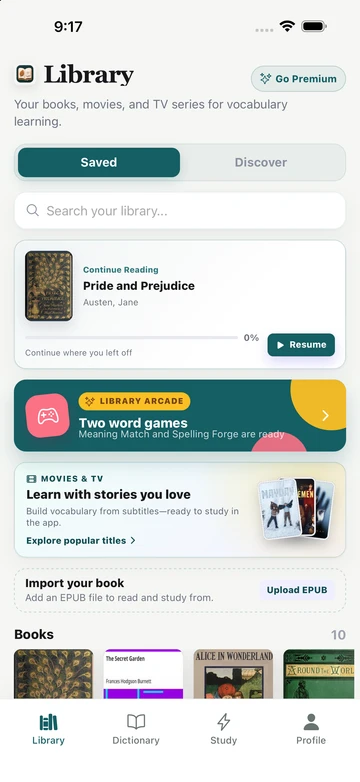
TeakReader turns books into a vocabulary system. Read classics, import EPUBs, tap unfamiliar words, and let one shared vocabulary memory track what you know across books, movies, and TV subtitles.


The reading problem
Reading real English gives you grammar, phrasing, and vocabulary in context. The hard part is staying with the story when every unknown word sends you to another app, another tab, or a separate notebook.
TeakReader keeps the lookup, translation, vocabulary decision, and review path inside the reading experience, so a difficult sentence can become a study moment without ending the session.


Shared vocabulary memory
The important difference is not just that TeakReader can define a word. It remembers your vocabulary decisions across books, EPUBs, Project Gutenberg classics, movies, and TV subtitles.
When you mark a word as Known, Learning, or Ignored, that knowledge becomes part of your larger English profile. The next book or show can be easier to judge because TeakReader can surface what is still unknown and most worth studying.
How it works
TeakReader connects the reading habit and the review habit, so your vocabulary list comes from sentences you already met.
Start with included classics, search Project Gutenberg, or import your own EPUB file.
Open definitions, translations, phonetics, examples, and related forms without leaving the page.
Save words as Known, Learning, or Ignored so TeakReader can remember your vocabulary across media.
Use frequency-ranked word lists, CEFR stats, and flashcards to focus on words that matter next.
Book sources
Use included books, search public-domain titles from Project Gutenberg, or import an EPUB you already want to read. Every source feeds the same dictionary, vocabulary, analytics, and flashcard flow.


FAQ
Yes. You can start as a guest, read included books and movies, look up words, save vocabulary, and use core learning tools without creating an email, Apple, or Google account.
Yes. TeakReader keeps one vocabulary memory across books, EPUB uploads, Project Gutenberg classics, movies, and TV subtitles, so words you mark as Known, Learning, or Ignored can inform future reading and study.
Yes. Unmastered words from your books automatically become playable levels in Meaning Match (definition recognition) and Spelling Forge (active recall spelling) in the built-in Arcade.
Yes. TeakReader supports personal EPUB imports, then processes the book for reading, word lookup, vocabulary tracking, comprehension analytics, and flashcard study.
Yes. TeakReader includes Project Gutenberg search, so you can find public-domain classics and add them to your library for vocabulary learning.
Yes. For processed books and subtitle sets, TeakReader can show known, learning, unknown, and ignored vocabulary, plus frequency-ranked unknown words and CEFR-level breakdowns.
Yes. TeakReader supports word translation and sentence translation inline, subject to the limits of your free or premium plan.
Yes. TeakReader is available on iPhone, iPad, and supported M-series Macs through the App Store, and on Android through Google Play.
No. Beginners can start with easier material and tap words often, while intermediate and advanced learners can use comprehension stats, CEFR levels, and unknown-word lists to choose more challenging books.
Ready to read
Download TeakReader on the App Store or Google Play for iPhone, iPad, supported M-series Macs, and Android.