Project Gutenberg
A public-domain ebook library where readers can find free classics and source texts.
Free classics with vocabulary help
TeakReader helps you turn public-domain classics into English vocabulary practice. Search Project Gutenberg, add a book, tap unfamiliar words, translate difficult sentences, and review vocabulary from the chapters you actually read.



The classic book problem
Project Gutenberg is a wonderful source of public-domain books, but many classics were written for native readers and can feel dense for English learners.
Looking up words in a separate dictionary interrupts the sentence. TeakReader makes those free books more studyable by keeping lookup, translation, unknown-word stats, and review close to the text.


Public-domain discovery
TeakReader includes Project Gutenberg search so you can find classic public-domain books and add them to your library for reading and vocabulary study.
The goal is not to replace Project Gutenberg. It is to give English learners a study layer around the books they choose.
Built-in dictionary
Classic literature can contain older phrasing, unfamiliar forms, and high-value vocabulary. TeakReader keeps definitions, examples, related forms, translation, and Known/Learning/Ignored controls in the reading flow.


Difficult passages
For long or older-style sentences, word lookup may not be enough. TeakReader supports sentence translation for tricky passages, subject to your free or premium plan limits.
Use translation as a reading aid: it helps you stay with the book while the original text remains the material you are learning from.
Reading readiness
For processed books, TeakReader can show chapter comprehension, unknown-word counts, CEFR distribution, top unknown words, and Study buttons. That makes a classic easier to approach one chapter at a time.


Long classics made easier
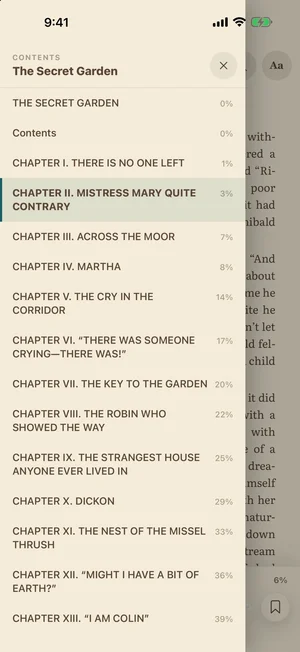
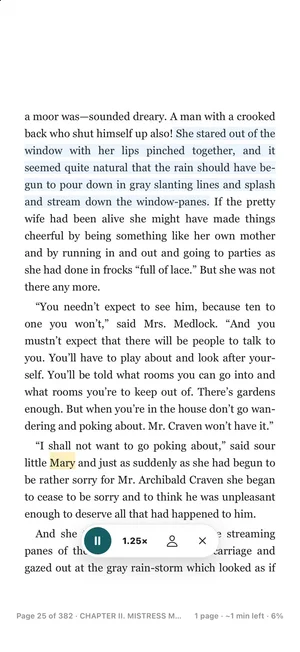
Classics are long and the language is old-fashioned. Two tools help: read aloud reads the book to you with each sentence highlighted, and the contents and search let you jump to any chapter or find every place a name appears.
Your place, bookmarks, and highlights are saved to your account, so you can start a book on your phone and finish it on a tablet.
Review from the book
Words from a public-domain classic can become flashcard review in TeakReader. Study vocabulary from the actual chapters you read, then let Known, Learning, and Ignored decisions update your larger vocabulary memory.
A word learned from a classic can count later in another book, movie, or TV subtitle set.

What TeakReader adds
TeakReader focuses on the learner workflow around public-domain books: find a classic, read it, understand difficult words, and review what actually appeared in the text.
A public-domain ebook library where readers can find free classics and source texts.
Good for opening books, but vocabulary study often happens in another dictionary or notes app.
Useful for definitions, but they usually do not know your book, chapter, or unknown-word pattern.
Adds dictionary lookup, sentence translation, CEFR stats, chapter readiness, and flashcards around the book.
FAQ
Yes. TeakReader includes Project Gutenberg search so you can find public-domain classics and add them to your library for reading and vocabulary study.
Project Gutenberg offers free public-domain ebooks. TeakReader adds a learner-friendly reading workflow with dictionary lookup, translation, vocabulary tracking, analytics, flashcards, and word games.
Yes. Words you encounter while reading Gutenberg books automatically populate Meaning Match (definition recognition) and Spelling Forge (active recall spelling) in the Arcade.
Yes. TeakReader can show dictionary definitions, sentence translation, chapter comprehension, CEFR vocabulary stats, and top unknown words to help you study difficult passages.
Yes. Vocabulary from books you read in TeakReader can feed flashcards and spaced-repetition review.
No. TeakReader helps you read and study the original text with lookup, translation, analytics, and review tools.
Yes. TeakReader supports personal EPUB imports as well as Project Gutenberg discovery.
Once a book is loaded into your library, you can read it offline. Looking up words, translations, and playing online arcade games require network connectivity or supported offline dictionary downloads.
Yes. TeakReader is available on iPhone, iPad, and supported M-series Macs through the App Store, and on Android through Google Play.
Ready to read
Download TeakReader on the App Store or Google Play for iPhone, iPad, supported M-series Macs, and Android.