Read a real page
Use an EPUB, included book, or Project Gutenberg classic instead of starting from a generic list.
Vocabulary from real reading
TeakReader turns reading into a vocabulary system. Open a book, tap unfamiliar words, save the useful ones, track what you know, and review with flashcards from real sentences.


The word-list problem
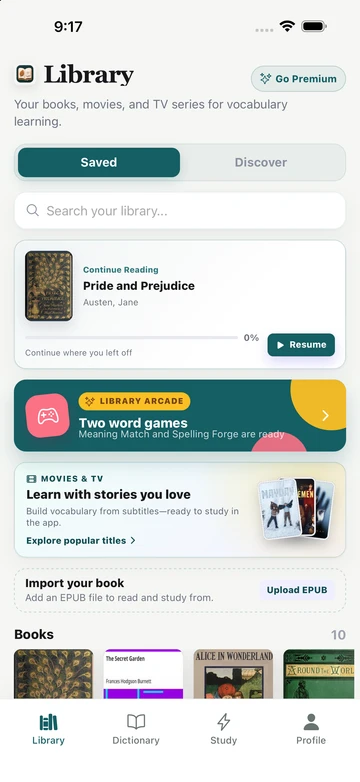
Generic lists can teach common words, but they often miss the moment that makes a word memorable. Books give you that moment: the scene, the character, the argument, and the sentence where the word mattered.
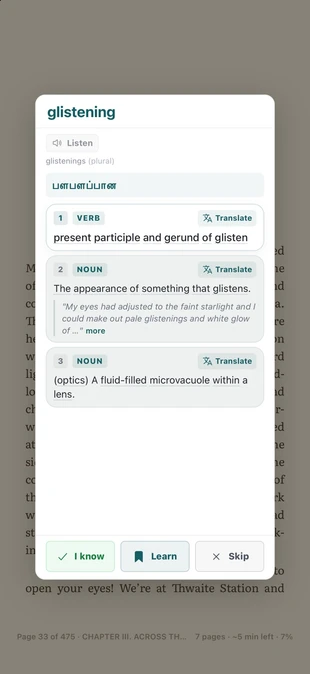
TeakReader keeps that reading context close. You can look up the word, decide whether to learn it, and review it later without rebuilding a separate notebook by hand.

Vocabulary memory
When you mark a word as Known, Learning, or Ignored, TeakReader can use that decision across future books, EPUBs, Project Gutenberg classics, movies, and TV subtitles.
That means a book is not just reading practice. It becomes evidence for what you know, what is still unknown, and what is worth reviewing next.
How it works
Instead of guessing which words to study, start from the words that appear in the reading you already want to understand.
Use an EPUB, included book, or Project Gutenberg classic instead of starting from a generic list.
Tap words in context and mark the ones you want to learn.
Use known, learning, unknown, frequency, and CEFR signals to see what keeps appearing.
Practice flashcards from words that came from your own reading.
Before and during each chapter
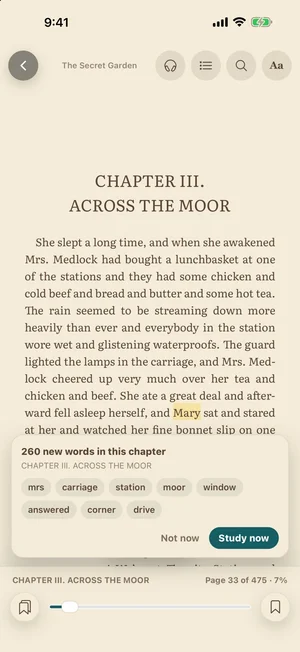
When you move into a new chapter, TeakReader shows how many words in it are new to you and the most frequent ones. Tap Study now to learn them in a short flashcard round, or Not now to keep reading.
Words you save as Learning get a soft tint wherever they appear, in every book. Meeting a word again in a new sentence is one of the best ways to remember it, and the tint makes sure you notice.
Both aids can be switched off under Learning in the reader’s Aa menu.

Review loop
A lookup answers the moment. A review habit makes the word usable later. TeakReader connects both so the words you save while reading can become flashcards instead of disappearing after the chapter.


Book sources
Start with the books you actually want to read. TeakReader supports EPUB imports and Project Gutenberg search, then connects the same lookup, vocabulary stats, and flashcard tools to each processed book.

FAQ
Yes. Reading gives you vocabulary in real sentences. TeakReader helps by letting you tap unfamiliar words, mark useful ones for study, and review them later with flashcards and word games.
Yes. Words you mark while reading become part of your flashcard review and create levels in Meaning Match and Spelling Forge in the Arcade.
Yes. TeakReader tracks Known, Learning, Ignored, and unknown vocabulary across supported books and subtitles.
Yes. TeakReader supports EPUB imports. It does not support Kindle DRM, PDF, MOBI, or AZW files.
Yes. TeakReader includes Project Gutenberg search for public-domain classics that can feed the same vocabulary workflow.
Yes. Intermediate learners often benefit because books repeat important words in context. TeakReader adds lookup, CEFR stats, games, and review so reading does not become guesswork.
Yes. TeakReader is available on iPhone, iPad, and supported M-series Macs through the App Store, and on Android through Google Play.
Ready to read
Download TeakReader on the App Store or Google Play for iPhone, iPad, supported M-series Macs, and Android.