Choose a title
Open the movie or TV series vocabulary you want to prepare on your phone or tablet.
Subtitle vocabulary, built for mobile study
Language Reactor is excellent for interactive Netflix and YouTube subtitles in its browser workflow. TeakReader solves a different mobile problem: preview difficult movie and TV words on iPhone or iPad, study them with flashcards, and connect that vocabulary with the books you read.


Updated

The honest answer
Language Reactor adds language-learning controls to supported video websites. TeakReader does not play videos, display dual subtitles over a stream, or connect to a streaming account.
TeakReader is the better fit only when your goal is to prepare and retain subtitle vocabulary on mobile—especially when you also want EPUB books, Project Gutenberg classics, and one shared record of the words you know.
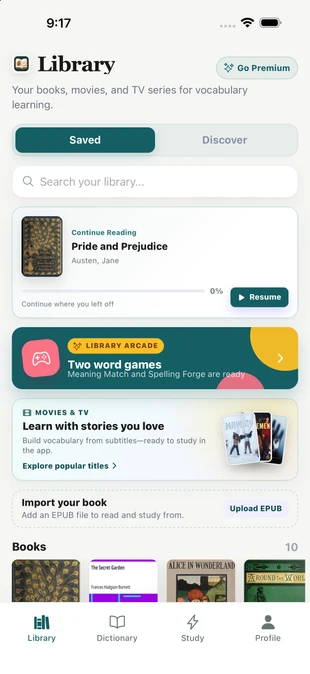
A mobile-first alternative
Live dual subtitles are not the only way to learn from screen dialogue. A short pre-watch session can surface the smaller set of words most likely to interrupt comprehension.
TeakReader ranks unknown words by frequency and keeps the result on your phone, so vocabulary preparation can happen during a commute or just before movie night—not only while a browser video is open.
Honest comparison
These products overlap around vocabulary, but their central jobs are different. This comparison was checked against Language Reactor's official help and update pages on September 16, 2026.
| Comparison | Language Reactor | TeakReader |
|---|---|---|
| Best fit | Interactive subtitle tools while watching supported Netflix and YouTube content. | Preparing English vocabulary from movies and TV on mobile, then reviewing it later. |
| Core platform | Browser extension and LanguageReactor.com study tools. | Native iPhone, iPad, Android, and supported M-series Mac app. |
| Streaming playback | Adds learning controls to supported Netflix and YouTube browser pages. | Does not stream video or modify streaming apps. |
| Before-watching study | Video-first workflow with saved words and PhrasePump review. | Frequency-ranked unknown words, CEFR signals, and flashcards before pressing play. |
| Books and EPUBs | Includes web text and book study tools; the extension is centered on video websites. | Personal EPUB reader plus built-in Project Gutenberg discovery. |
| Vocabulary memory | Saved words and phrases inside the Language Reactor workflow. | Known, Learning, Ignored, and Unknown states shared across books, movies, and TV. |
Source: Language Reactor official getting-started guide and official update history. Features can change; verify current availability with each product.
Personalized difficulty
A generic subtitle transcript cannot tell which words you already know. TeakReader combines source frequency with your Known, Learning, Ignored, and Unknown states to make the preview personal.
CEFR distribution provides another difficulty signal, while frequency helps prioritize words likely to appear repeatedly in the title.

How the mobile workflow works
The goal is not to memorize every subtitle line. It is to remove enough vocabulary friction that the dialogue becomes easier to follow.
Open the movie or TV series vocabulary you want to prepare on your phone or tablet.
Review frequent unknown words, CEFR levels, and your current comprehension signals.
Mark useful words and practice them with flashcards or Meaning Match and Spelling Forge.
Return to your preferred streaming service and watch with the difficult vocabulary already primed.

One vocabulary memory
TeakReader's strongest difference is not another subtitle overlay. It is the connection between screen dialogue and reading. A word learned from a TV episode can already count as known when it appears in an EPUB chapter later.
That same word can move through flashcards, Meaning Match, and Spelling Forge instead of disappearing when the closing credits roll.
FAQ
TeakReader is an alternative for one specific job: studying movie and TV subtitle vocabulary on iPhone or iPad before watching. It is not a dual-subtitle video player or browser extension.
No. TeakReader does not stream, play, modify, or integrate with Netflix, YouTube, Disney+, Crunchyroll, or other streaming services. It focuses on vocabulary study from books and processed subtitle data.
Yes. TeakReader can show frequency-ranked unknown words, CEFR vocabulary signals, Known and Learning states, and flashcards from processed movie and TV subtitle vocabulary.
Yes. Words from movie and TV subtitle vocabulary can feed TeakReader's spaced-repetition flashcards and word games.
Language Reactor's official documentation describes a browser-extension workflow for Netflix and YouTube. TeakReader takes a different approach on iPad: prepare subtitle vocabulary in a native study app instead of adding an overlay to the video player.
Choose Language Reactor for interactive subtitles while watching supported Netflix or YouTube content in its browser workflow. Choose TeakReader for mobile pre-watch vocabulary, EPUB reading, Project Gutenberg, CEFR signals, flashcards, and one vocabulary memory across books and subtitles.
Yes. TeakReader is available on Android through Google Play and on iPhone, iPad, and supported M-series Macs through the App Store.
Ready to read
Download TeakReader for iPhone, iPad, supported M-series Macs, or Android. TeakReader is a vocabulary study app, not a streaming service.